SAT Test Day Schedule & Timing
Understanding what to expect on SAT® test day can make the experience feel much less overwhelming. Many students planning for the day of SAT wonder what time the SAT test starts and ends because it helps with transportation, meals, and pacing. The exact schedule may vary slightly by testing center, but once the SAT exam begins, the timing and structure are fixed. Knowing the flow of the day helps you stay focused throughout the test. Arriving early, following instructions, and being familiar with the routine will help you start the exam with less stress.
What time does the SAT start and end?
On test day, the SAT follows a step-by-step process that helps keep everything organized. Knowing the order of events can make the morning feel smoother and less rushed. The schedule below is to give you a general idea of how the day flows from arrival to dismissal. Students testing with SAT accommodations may follow a different schedule.
Approximate Saturday SAT Schedule
- 7:15 a.m. Students using a loaned College Board® testing device arrive at the test center
- 7:45 a.m. All students check into the test center
- 8:00 a.m. Test center doors close
- 8:15 to 8:30 a.m. Testing starts
- 10:45 to 11:00 a.m. Standard time testing ends
- 12:00 to 12:15 p.m. Time and one-half testing ends
- 1:00 to 1:15 p.m. Double-time testing ends
What to Expect on Test Day
The SAT follows a structured process from arrival to dismissal, and understanding how check-in, testing procedures, breaks, and submission work can help you focus on doing your best. Beyond just the rules, knowing the specific timeline, including exactly when the SAT ends and what time testing finishes, can make the entire experience feel much more manageable.
Arrival and Check In
- Test center doors usually open around 7:45 a.m.
- Arrive on time. Confirm the test center address and arrival time on your admission ticket.
- Once testing begins, students cannot enter. If you’re late or absent, you must register again and pay standard fees.
- If you are approved to borrow a device from the College Board, arrive about 30 minutes early to complete setup.
Seating and Setup
- You will not choose your own seat; the proctor assigns it.
- Connect to Wi-Fi and open the Bluebook™ testing app once seated.
- The proctor will provide a start code. Entering this code officially begins your testing time.
- The proctor may explain procedures, but cannot clarify test content or questions.
Using Bluebook and Test Tools
- Bluebook includes helpful digital tools like a calculator, SAT math reference sheet, annotation tools, cross-out features, and question review markers.
- Each section includes two timed modules, and you can move freely within a module until time runs out.
- Once you move to the next module, you cannot return to the previous one.
- If your connection drops or submission fails, your work stays saved on your device and can be resubmitted by the end of the following day.
Breaks
- You will get one scheduled 10-minute break between sections.
- You may take an unscheduled break if necessary, but it reduces your testing time.
- Keep your ID with you and leave your device open.
- If you brought a calculator, it must remain on your desk during breaks.
Submission and Dismissal
- After the final module, your answers are submitted automatically.
- If the submission fails, you will have time to try again. Nothing is lost because answers stay saved locally.
- Most students finish before noon. Students with extended time may finish later.
- The proctor will collect scratch paper and dismiss students quietly since others may still be testing.
What to Do Before the Test
Preparing ahead makes the day of the SAT feel smooth and stress-free. Many students focus only on studying, but organization and planning are just as important for a successful SAT exam day. Making sure your documents, device, and test center details are ready helps avoid last-minute problems. These steps also ensure you know exactly what to expect on the SAT and prevent delays or complications when you arrive.
Along with organizing your documents and device, reviewing a comprehensive SAT study guide can help you brush up on key concepts and feel confident on test day.
Print your admission ticket
Print your admission ticket at least a day before the test so you are not rushing on the morning of the SAT. Digital screenshots are not accepted, so you must bring a physical printed copy. Make sure your personal details appear clearly and match the ID you will bring. Keep your printed ticket with your test day essentials so you do not forget it.
Confirm your test center details
Double-check the test center location, arrival instructions, and any notes printed on your ticket. Some test centers include building numbers, room locations, or separate entrances, so knowing where to go prevents confusion and saves time. Planning your route helps you arrive on time and reduces test day stress. If you’re unsure, look up the location the day before the SAT or do a quick map check so you feel confident.
Get your device ready
You can take the digital SAT using an approved device. Before the test, make sure your device is charged, updated, and set up properly.
Approved testing devices include:
- Windows or Mac laptops
- iPads
- Windows tablets
- School-managed Chromebooks
Requirements and reminders:
- Download the Bluebook app before the SAT exam day.
- Complete the exam setup one to five days before testing so the app can verify your device and download your test.
- Your device must hold enough charge for about three hours. Bring a charger or portable battery if possible.
- You may bring an external mouse or keyboard if you use a tablet.
- If you are borrowing a device from the College Board, arrive at least 30 minutes early for setup.
Some electronics are strictly prohibited during the SAT, including breaks. Using, accessing, or even having these items produce noise can result in dismissal or score cancellation.
Prohibited items include:
- Mobile phones
- Smartwatches
- Fitness bands
- Headphones, earbuds, or AirPods
- Any device with messaging, camera, or audio playback features
Important reminders:
- Proctors may ask you to store prohibited items away from your desk or turn them in before the test starts.
- Personal electronic items are not the responsibility of the test center if lost or damaged.
- Do not attempt to use or check your phone during breaks.
SAT essentials to bring
Make a checklist of everything you need to bring to SAT day to ensure you’re fully prepared. A few important items include:
- Printed admission ticket
- Valid photo ID that matches your ticket
- Fully charged approved testing device with Bluebook installed
- Power cord or portable charger
- Approved calculator (optional but recommended)
- Two or more pencils or pens for scratch work
- Snacks and water for the scheduled break
The Digital Testing Application (Bluebook)
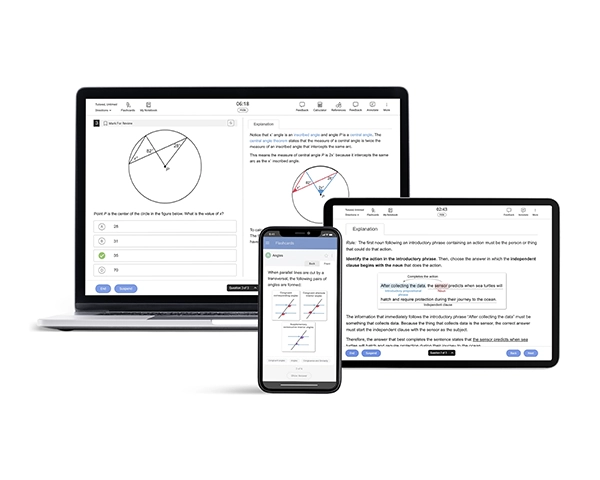
The SAT is now delivered digitally using the Bluebook application, which ensures a secure and standardized testing experience for all students. Bluebook handles everything from your admission ticket to timing, test delivery, and built-in tools. Familiarizing yourself with the app before test day helps reduce stress, ensures your device is ready, and lets you focus on answering questions rather than troubleshooting technical issues. Understanding how Bluebook works and the rules you must follow is an important part of preparing for the SAT exam day.
What Bluebook does on test day
On test day, Bluebook is your main interface for completing the digital SAT. Here’s what it handles:
Admission Ticket
- Your admission ticket is generated during exam setup in Bluebook.
- You will need a printed copy or access it according to the test center instructions.
Test Launch
- After check-in, the proctor provides a start code. Entering this code launches your timed test.
- Once the test starts, Bluebook locks the device into test mode, preventing access to other apps.
Built-in Tools
- Timer: Tracks remaining time for each module and provides optional alerts.
- Calculator / Desmos: For math sections, a built-in calculator is available, along with Desmos for graphing functions.
- Reference Sheet: Math formulas and equations are provided in-app.
- Text Tools: Highlight passages, leave notes, and use a line reader in Reading & Writing sections.
- Review Features: Mark questions for review, cross out answer options, and navigate freely within each module.
Familiarizing yourself with Bluebook is essential, but practicing with a digital SAT Question Bank can help you get used to the question types, timing, and tools before test day.
Key Bluebook rules
Before you begin, Bluebook asks you to accept its privacy and use policies.
- What Bluebook Monitors and Enforces: Bluebook tracks your device information and in-app activity to keep the test secure. It monitors device type, operating system, memory, screen resolution, battery, and how you navigate and use tools. This ensures the exam runs correctly and maintains test security.
- No Switching to Other Apps or Programs: The app runs in lockdown mode, blocking access to other programs or apps. Messaging apps, writing assistants, VPNs, or any other software cannot be used during testing. Attempting to access other apps may lead to dismissal and score cancellation.
- No Screenshots, Reverse-Engineering, or Tampering: Students cannot take screenshots, reverse-engineer, decompile, or tamper with Bluebook. These rules protect test integrity and ensure a fair testing experience for all students.
- Auto-Save and Handling Interruptions: Bluebook automatically saves your answers as you work. If your device closes or you briefly lose internet, your responses remain safe, and you can resume from where you left off. Device swaps may be allowed under proctor supervision.
What If Something Goes Wrong?
Even with careful preparation, unexpected issues can happen on the day of the SAT. Knowing how to handle device problems, network interruptions, or personal emergencies can help you stay calm and avoid losing time. The College Board has procedures in place to make sure you can continue testing whenever possible.
Device battery dies/freezes
If your device battery runs out or the device freezes during the test, don’t panic. Bluebook automatically saves your answers up to that point. Notify your proctor immediately, and they can help you either restart the device or switch to a backup device if available. Your testing time will continue once the issue is resolved.
Network drops
A brief loss of internet connection will not cause you to lose your work. Bluebook saves your answers automatically, and you can reconnect to continue the test. In most cases, your timer is paused during the interruption. If the problem persists, the proctor will provide guidance on how to resume testing safely.
You’re sick or need help
If you feel unwell or need assistance during testing, raise your hand, and a proctor will come to help. They can provide water, medical attention, or allow a short break as needed. In cases where you cannot continue, you may be able to reschedule the test according to College Board policies, but it is important to notify staff immediately.
Digital SAT Test – Do’s and Don’ts
Taking the digital SAT comes with a few important rules and best practices to ensure your test runs smoothly. Following these do’s and don’ts can help you avoid technical issues, stay within the rules, and make the most of your testing time. Use this checklist to prepare and review before the SAT.
Do’s
- Ensure your device is fully charged and that Bluebook is installed and up to date.
- Bring your printed admission ticket and a valid photo ID.
- Familiarize yourself with Bluebook tools, such as the timer, calculator, highlighting, and marking for review.
- Arrive early if you need to borrow a device from the College Board.
- Notify the proctor immediately if your device freezes, battery dies, or you encounter network issues.
- Keep your ID and any approved materials with you at all times.
Don’ts
- Do not switch to other apps or programs during the test.
- Avoid taking screenshots, recording, or tampering with Bluebook.
- Do not bring prohibited devices such as phones, smartwatches, or headphones.
- Never leave your device closed or turned off during testing.
- Do not panic if there’s a brief network drop; follow the proctor’s instructions.
In addition to following test day best practices, a structured SAT prep course can guide you through full-length practice tests, strategies, and personalized feedback to maximize your score.
What to Expect on SAT Test Day: FAQs
What time do I need to arrive for the Digital SAT?
You should arrive at your test center early to complete check-in and any device setup. Doors typically open at 7:45 a.m., and students using a loaned device may need to arrive 30 minutes earlier. Arriving on time ensures you can get settled, review your materials, and start testing promptly without stress. Always check your admission ticket for your specific arrival instructions.
What if my device dies or Bluebook crashes mid-test?
If your device runs out of battery or Bluebook freezes, your answers are automatically saved up to that point. Notify your proctor immediately, who can help you restart the device or switch to a backup device if available. Your testing time will continue once the issue is resolved, so remain calm and follow the proctor’s instructions carefully.
When will my digital SAT scores be released?
SAT scores are typically available within a few days to a few weeks after your test. Exact SAT score release dates may vary depending on when you completed the exam and whether any technical issues occurred during administration. Check your College Board account regularly for your official score report.