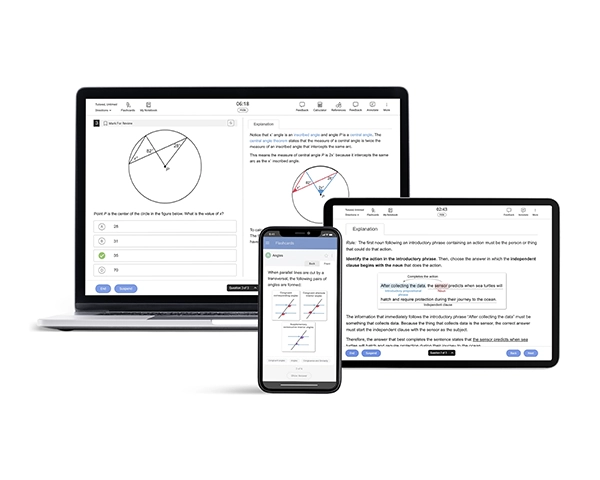
Why Use an SAT Prep App?
Tired of bulky books and rigid classes? The best SAT® prep apps bring all your study tools to your phone, so you can prep anywhere, anytime. From tracking your progress to giving you personalized quizzes, a great SAT prep app adjusts to your pace and goals. It’s the smart, flexible way to boost your score without the stress.
What Makes a Good SAT Prep App?
The best SAT prep apps combine smart features with a smooth user experience by providing you adaptive practice, detailed explanations, full-length tests, and progress tracking. A great example is the UWorld SAT Prep App, which offers all these features in one easy-to-use platform.
- Adaptive Practice Questions: Apps with adaptive question banks adjust to your skill level, ensuring every session is challenging but not overwhelming. This kind of targeted practice helps students build skills more efficiently.
- Full-Length Practice Tests: Simulating the real test is key to building confidence. The best SAT app will include full-length practice tests with realistic timing to prepare you for the actual exam experience. If you're looking to build test-day stamina without spending right away, look for the best SAT prep app free trials that include at least one timed practice test.
- Detailed Answer Explanations: Quality SAT test prep apps offer clear, step-by-step explanations for every question. This helps students learn from their mistakes and understand the concepts behind the answers.
- Progress Tracking and Analytics: Tracking your performance helps you stay focused and goal-driven. Top apps show your strengths, weaknesses, and trends over time so you can adjust your study plan effectively.
- Video Lessons: The best SAT prep apps include short, engaging video lessons that break down difficult concepts and test strategies. These are especially helpful for visual learners and can reinforce material covered in practice questions.
- Study Guide Integration: Look for apps that offer a structured study guide or personalized study plan. It will help you stay organized, set realistic goals, and cover all exam topics in a timely manner.
- Digital Tools: Smart tools such as digital flashcards and an in-app notebook make review sessions more effective. Flashcards help with quick recall, while notes allow you to jot down tips, formulas, or concepts to revisit later.
“Best SAT preparation app ever. This is all I wanted… Thanks, UWorld. I really appreciate it.” —A Google User.
Factors to Consider: Which SAT Prep App is Right for You?
Not all SAT prep apps are the same, so it's important to find one that fits your learning style and goals. Here are key questions to ask yourself when choosing the best SAT prep app:
-
Does the app offer adaptive practice tailored to your current skill level?
-
Are there full-length practice tests to help you build test-day stamina?
-
How detailed are the answer explanations?
-
Can you track your progress and pinpoint your areas of improvement over time?
-
Is the app easy to use and offers flexibility?
-
Does it offer free content or a trial so you can test it before committing?
These questions can guide you toward the best SAT app that fits your schedule, study needs, and budget.
Comparison Table of the Best SAT Apps
To help you find the best SAT prep app, we’ve compared top-rated options based on their features, pricing, and strengths. Use this table to see which app best fits your study needs.
| SAT Mobile App Features | |||
|---|---|---|---|
| UWorld | Princeton Review | Kaplan | Prep Scholar |
|
|
Does not provide an SAT prep app | Does not provide an SAT prep app |
Best SAT Prep Apps: Pros & Limitations
Every app has strengths and gaps depending on your learning style, budget, and prep timeline. Below, we break down the pros and limitations of each so you can find the best SAT prep app for your goals.
UWorld
Pros:
- Offers hundreds of realistic digital SAT-style practice questions with step-by-step, visual explanations that build deep understanding rather than memorization. Features like flashcards, My Notebook, and adaptive learning tools reinforce concepts and make review interactive and effective.
- Highly flexible for on-the-go study, with customizable quizzes, synced progress across devices, and detailed analytics to track improvement and target improvement areas, helping students study smarter and more efficiently.
Limitations:
- Requires a subscription, which may not suit students looking for free prep options.
- Best for serious practice; not a quick game-style app.
Princeton Review
Pros:
- Offers a variety of prep tools, such as lessons, drills, flashcards, and full practice tests, which helps cover different learning styles and keeps prep comprehensive.
- Provides score reports and analytics so students can identify strengths and weaknesses, helping them target their study, smartly.
Limitations:
- The free/downloaded app offers a limited number of practice tests and resources. You may need to purchase courses or subscriptions to get full access.
- As with many large prep providers, some users might find the structure less flexible or personalized compared with adaptive or custom-built study tools targeted to individual weaknesses.
Kaplan and Prep Scholar
- Neither provides an SAT prep app.
Why UWorld Stands Out as an SAT Prep App
UWorld sets itself apart from other SAT prep apps through its high-quality practice questions that mirror the real exam in both format and difficulty. The SAT prep course helps students build test-taking confidence and develop a realistic sense of what to expect on test day. What truly makes UWorld effective is the depth of its answer explanations. Each solution breaks down the logic behind correct and incorrect choices, helping students learn from their mistakes and strengthen core concepts.
In addition to its content quality, UWorld offers helpful features like performance tracking and custom quizzes, making it easy for students to monitor progress and target specific areas. Students also benefit from short, engaging video lessons, a structured and comprehensive study guide, and digital tools like flashcards and notebooks to support active recall and personalized review. For students serious about improving their SAT scores through consistent, high-level practice, UWorld delivers a reliable and focused prep experience.

Study Anywhere, Anytime


Who Should Use an SAT Prep App?
SAT prep apps are a smart choice for many types of students, thanks to their flexibility, affordability, and ease of use. Here's who can benefit the most:
- Self-Paced Learners: If you like setting your own study schedule and moving at your own speed, an SAT test prep app is perfect. You can focus more on the areas you struggle with and skip what you already know.
- Students with Busy Schedules: Between school, sports, and extracurriculars, finding time for SAT prep can be tough. The best apps for SAT prep let you study whenever you have a few minutes.
- Budget-Conscious Families: Don’t want to spend hundreds on tutors or test prep courses? Many SAT apps are affordable or offer free trials, giving you access to top-quality study tools without the high cost.
- Visual and Interactive Learners: Some students learn best through videos, visuals, and hands-on practice. The best SAT apps are packed with interactive features that make studying feel less like a chore and more like a game.
No matter your lifestyle, learning style, or budget, there's likely an SAT test prep app out there that’s a great fit for you.
How to Use an SAT Prep App Effectively
To truly benefit from the best apps for SAT prep, it's important to use them strategically. Here’s a step-by-step plan to maximize results:
- Start with a Diagnostic Test: Use a full-length practice test to figure out your baseline score and target areas for improvement.
- Set Weekly Goals: Use a quality SAT prep book and start with the topics that challenge you the most. Focusing on your weak areas early on can lead to the biggest score improvements. Once you’ve built confidence, shift to reinforcing your strengths. Planning week by week keeps your prep structured and purposeful.
- Commit to a Daily Routine: Even 20 minutes a day adds up. The key is consistency, not cramming.
- Analyze Your Mistakes: Always review explanations, even for questions you got right. Understanding the “why” strengthens long-term retention.
- Use Flashcards or Notes in the App: Many SAT apps let you bookmark questions or create flashcards. Use those features to reinforce key concepts.
- Mix It Up: Keep your prep engaging by alternating between timed practice on topics you’re comfortable with and focused study sessions for tougher concepts. On focused days, spend time watching video lessons, reviewing explanations, and practicing related questions to deepen your understanding.
By following a structured, consistent approach and using your SAT prep app’s features wisely, you’ll build both skill and confidence over time. With the right strategy, steady effort, and the right tools, you’ll be well on your way to achieving your target score.
Frequently Asked Questions
Which SAT app is best for last-minute studying?
For your last-minute SAT prep, choose an app that focuses on timed practice, quick strategy refreshers, and realistic question types. UWorld is a strong option because its explanations help you learn fast from mistakes instead of guessing.
Is the UWorld SAT app good for the digital SAT?
Yes, the UWorld SAT app is designed for the digital format and mirrors the adaptive style of the official exam. It includes digital SAT question types, timing tools, and detailed explanations to help you understand the “why” behind each answer. If you’re preparing for the new digital SAT format, this app aligns closely with real test expectations.
Should I use multiple SAT apps or stick to one?
Using one high-quality SAT app is usually enough if it provides practice questions, explanations, and progress tracking. However, some students benefit from pairing one main app with a vocabulary or flashcard app for extra reinforcement. The key is consistency, not the number of tools.
Do SAT apps work for international students?
Absolutely. SAT prep apps are accessible worldwide and help international students study anytime, especially if test prep resources are limited locally. Just make sure the app supports the digital exam format and aligns with current testing guidelines.
Are mobile apps better than websites for SAT prep?
Mobile apps are more convenient if you want to study on the go and squeeze in short practice sessions. Websites may offer a larger workspace and better layout for long study sessions or full SAT practice tests. Many students use both depending on the type of practice they’re doing.
Related Articles
Ace the SAT with expert-led prep courses. Explore SAT programs with full-length practice tests, performance tracking, and proven score improvement.
Looking for quality SAT prep? Try QBanks with realistic questions, performance tracking, and expert answer breakdowns to maximize your score.
Discover the best SAT prep books for 2025-26 with full-length practice tests, expert strategies, review questions, and detailed explanations to boost your score.